 Plainware Focus
Block distracting websites with no cap on sites.
Block whole sites, or just part of one such as YouTube Shorts, always, on a schedule, after a daily time limit or during a focus session. It runs on your computer with no account, and the blocking, schedules, limits and timer are free with no cap on sites.
Free core tools, plus a one-time Pro. Made for Google Chrome 121 or newer, on Windows, Mac, Linux and ChromeOS.
Screens from Plainware Focus
Block lists 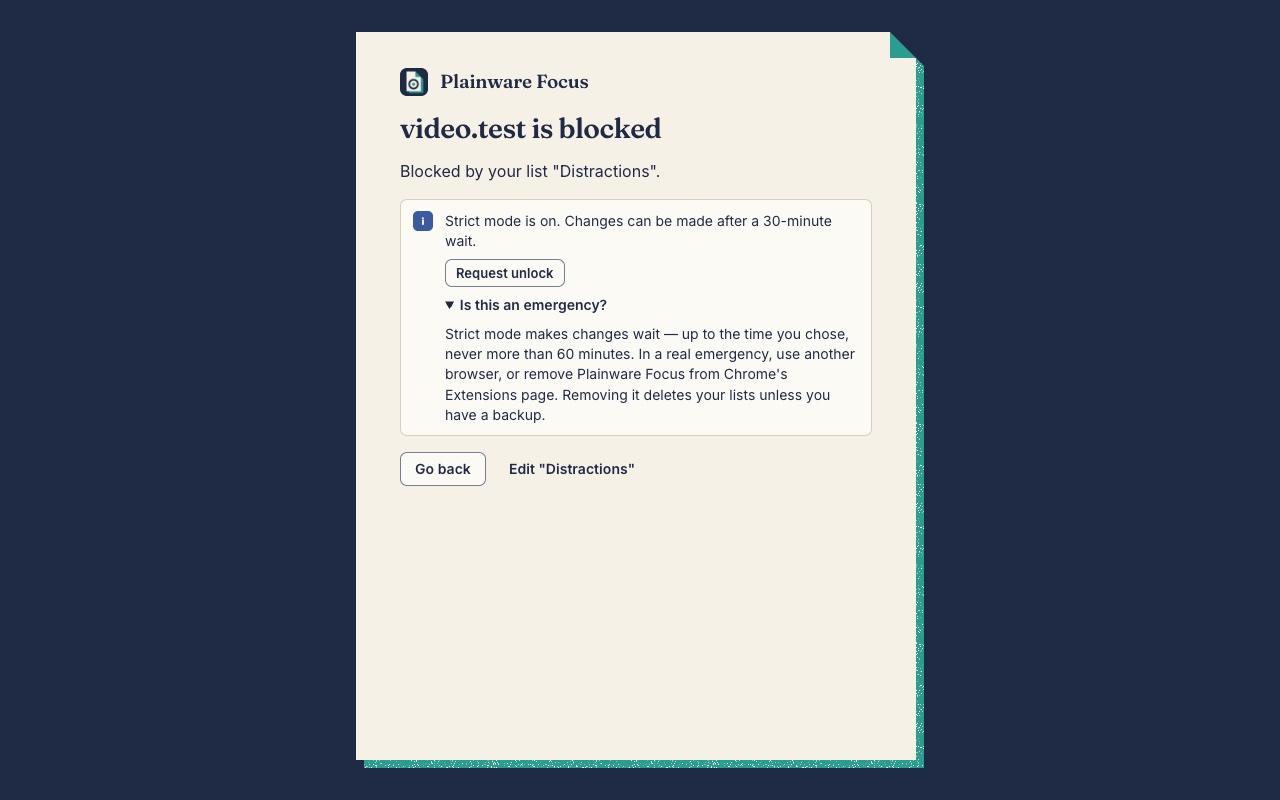
The block page 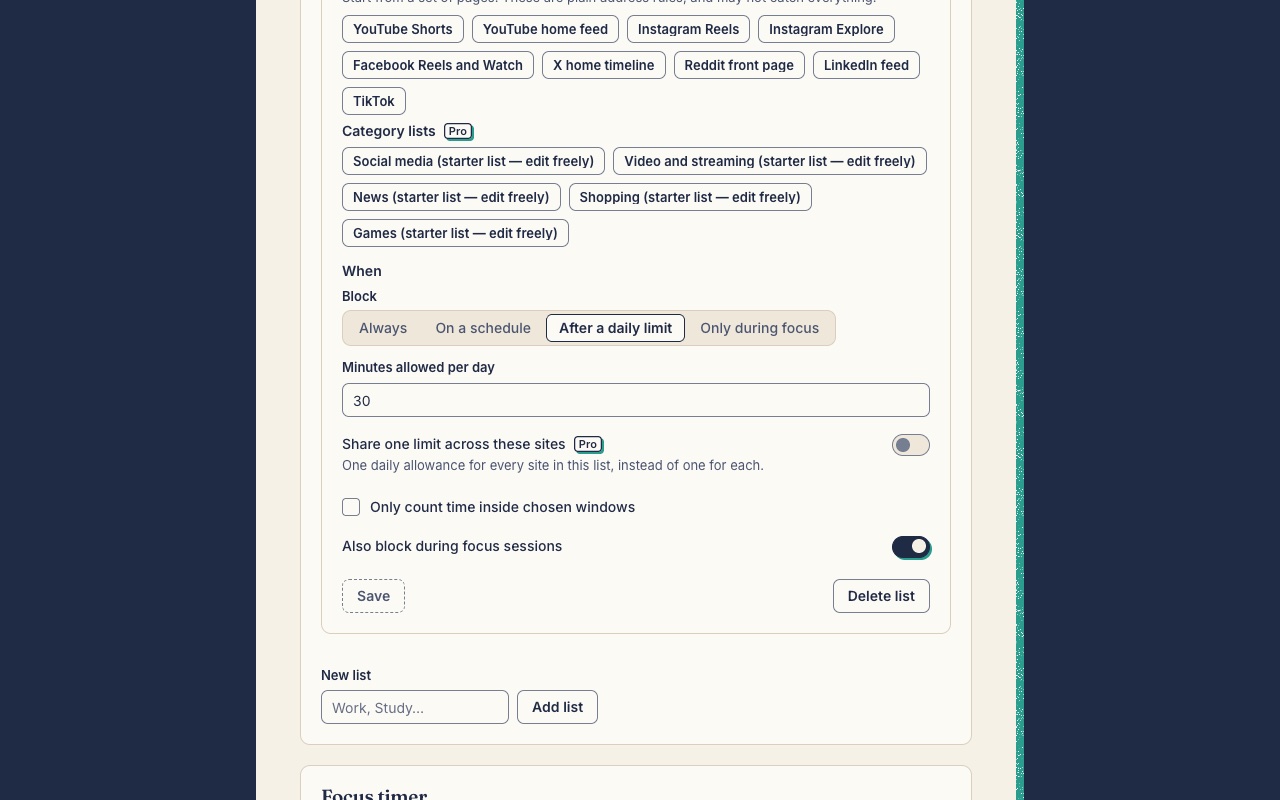
Daily limits 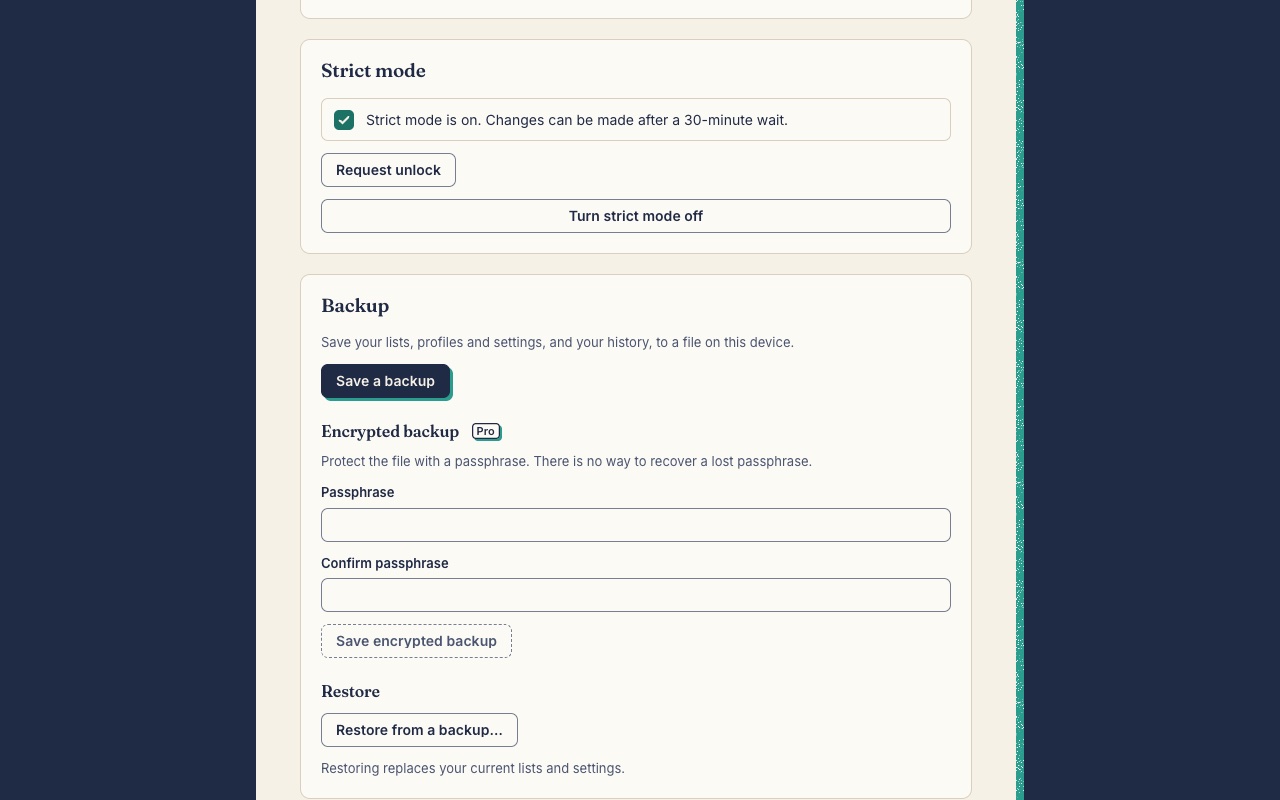
Strict mode (Pro)
What it does
Free tools
No cap on sites, no account, no ads.
Unlimited lists and sites
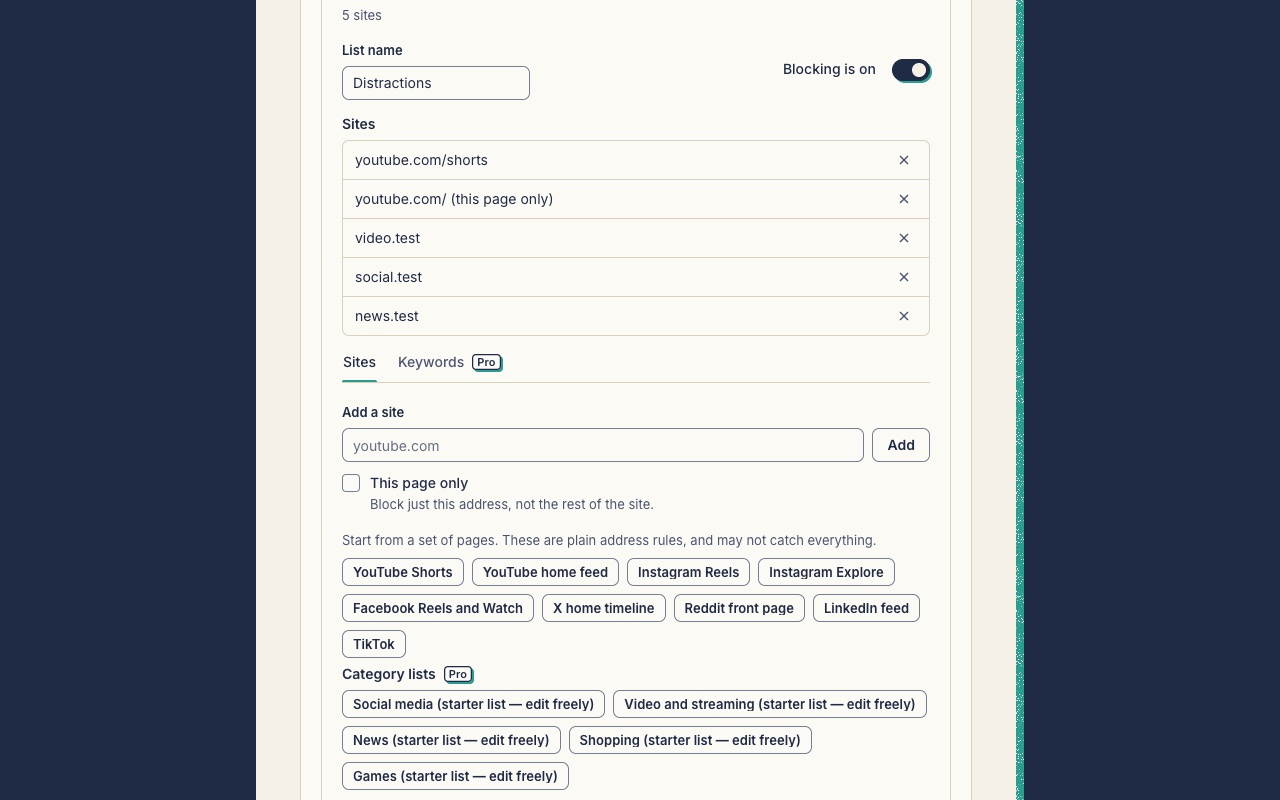
Make as many lists as you like, each with as many sites as you like. Block a whole site, part of a site such as youtube.com/shorts, or one exact page.
Four ways to block
Always, on a weekly schedule (overnight windows such as 22:00 to 06:00 work), after a daily time limit for each site, or only during a focus session.
Feed presets
One-click rules for YouTube Shorts, the YouTube home feed, Instagram Reels and Explore, Facebook Reels and Watch, the X home timeline, the Reddit front page, the LinkedIn feed and TikTok. They are plain address rules, and the app says what they can’t separate.
Block this site
Add the site you’re on from the toolbar popup in one click.
A calm block page
Shows what is blocked, which list blocked it, why, and until when. After a short wait you can unblock a site for a few minutes. No quotes, ads or shaming.
Blocking settings
Choose how long a site stays open when you unblock it (5, 10 or 15 minutes), how long the block page waits before the button works (none, 10 or 30 seconds), whether open tabs get a minute of grace, and the hour your day starts. These are free.
Focus timer
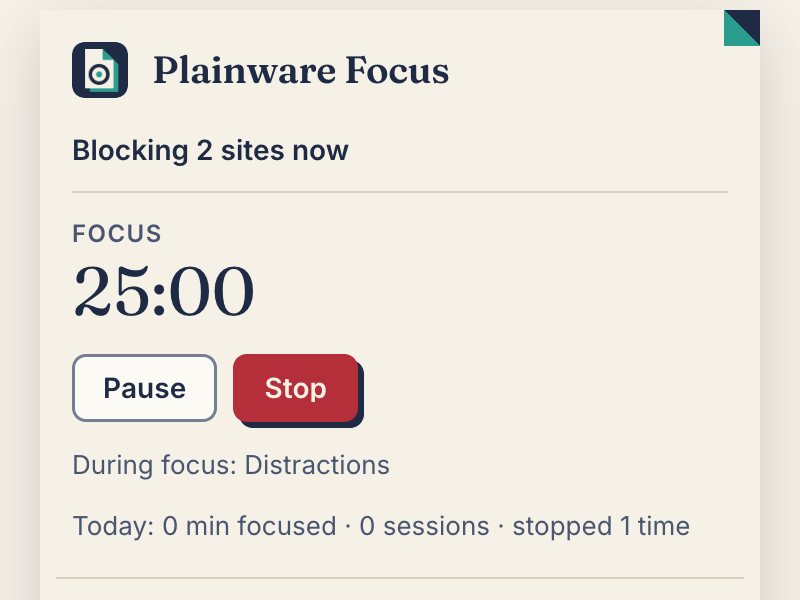
A Pomodoro timer (25 minutes and 5 minutes by default, all adjustable) or a stopwatch for “focus until I stop”. The toolbar badge shows minutes left. A notification and a chime are optional.
Seven-day stats
Minutes focused, sessions, times you were stopped and time on limited sites, for today and the last seven days. Stored on your computer only.
A minute of grace
When a block starts, tabs you already have open on that site get a minute before they move to the block page, so you don’t lose what you were typing. You can turn it off.
Where blocking works
A card in Settings says plainly where blocking works and where it can’t, including Incognito, with a button to Chrome’s details page.
Backup and restore
Save your lists, profiles, settings and history to a plain file and restore them from one. Restoring never needs Pro, and neither does making a plain backup. If the history can’t be read, the backup is saved without it and says so.
Pro tools
With Plainware Pro: ₹249 in India or $9 everywhere else, once.
Strict mode
Protected lists can only get stronger. To weaken one you ask to unlock and wait 5, 15, 30 or 60 minutes (your choice), then have ten minutes to make changes. The wait is never longer than 60 minutes. Turning strict mode on is the Pro step. Once it’s on, you can always see its status, ask to unlock and turn it off.
Password lock
Use a password instead of a wait, for example one a friend keeps. If you forget it, you can ask for a reset: after a fixed 60-minute wait the lock becomes an ordinary 15-minute wait.
Strict focus sessions
With strict mode on, a focus session can be set so it can’t be paused or stopped early. It follows the same rule as the lock: the unlock wait, or your password.
Keyword lists
Block any address containing a word. These show Chrome’s own blocked page instead of Plainware’s.
Category lists
Starter lists for Social, Video, News, Shopping and Games, each with at least 20 sites. You can edit them, and they don’t claim to be complete.
Shared daily limits
Set “30 minutes a day across these sites” instead of per site.
Profiles
Named sets of lists such as Work, Study and Weekend. Switch from the popup, or let them switch on weekly windows. Profiles you have already made keep working if Pro ever ends, and you can still switch between them. Making new ones or editing them needs Pro.
Full history and export
Look back over every day it has kept (up to 400 days) instead of the last seven, and export it as CSV files. Time in Incognito windows isn’t saved.
Encrypted backup
Protect the backup file with a passphrase. Encryption is AES-GCM with a key made by PBKDF2 at 600,000 iterations. We can’t recover a forgotten passphrase. Restoring any backup, encrypted or not, is free once you know the passphrase.
Free and Pro, side by side
| Tool | Free | Pro |
|---|---|---|
| Unlimited lists and sites | Included | Included |
| Four ways to block | Included | Included |
| Feed presets | Included | Included |
| Block this site | Included | Included |
| A calm block page | Included | Included |
| Blocking settings | Included | Included |
| Focus timer | Included | Included |
| Seven-day stats | Included | Included |
| A minute of grace | Included | Included |
| Where blocking works | Included | Included |
| Backup and restore | Included | Included |
| Strict mode Pro | Not included | Included |
| Password lock Pro | Not included | Included |
| Strict focus sessions Pro | Not included | Included |
| Keyword lists Pro | Not included | Included |
| Category lists Pro | Not included | Included |
| Shared daily limits Pro | Not included | Included |
| Profiles Pro | Not included | Included |
| Full history and export Pro | Not included | Included |
| Encrypted backup Pro | Not included | Included |
| Price | Free | ₹249 or $9, once |
| Cap on sites or lists | None | None |
| Ads or tracking | Never | Never |
| Account | Not needed | Not needed (key by email) |
| Works offline | Yes | Yes, after one key check |
Honest by design
- No cap on sites. Free blocking is never held back to sell Pro.
- No account, no ads, no analytics. The only network request is checking a Pro key.
- No scripts run inside the pages you visit, so it doesn’t slow them down.
- It says what it can’t block: Incognito unless you allow it, Guest windows, other browsers, and someone removing the extension.
- Strict mode makes changes wait, never longer than 60 minutes, and never hides Chrome’s own settings. It slows an impulse. It is not a security lock.
- If Pro ever ends, the blocks you saved keep running, and so do the profiles you made. It never quietly weakens your blocks.
Permissions, and why it asks
declarativeNetRequest- Chrome shows this as “Block content on any page”. It lets Chrome’s own blocking engine block the sites on your lists, on any site, without asking per site. Blocks keep working when Chrome restarts.
storage- Keeps your lists, settings, timer state and Pro licence in this browser.
alarms- Wakes it at schedule start and end times, when a daily limit runs out, and when a timer ends.
idle- Stops counting time on limited sites while you’re away, unless sound is playing.
offscreen- Plays the optional chime when a focus session ends.
activeTab- Lets “Block this site” read the current tab’s address when you click it, instead of asking to read all your tabs.
notifications (optional)- Asked only if you turn on “Tell me when a session ends”.
site access (optional, per site)- Asked for one site at a time as you add it. It lets Plainware show its block page, notice a page changing address without loading, move open tabs, and measure time on limited sites. Without it, Chrome shows its own “blocked” page and the site still doesn’t load.
block page (web-accessible)- Not a permission prompt. The block page can be opened from any site so a blocked address can be sent to it, which means a website could tell that Plainware Focus is installed.
Step-by-step guides
- Block distracting websites in Chrome
Block the sites that eat your time, with no cap on how many. Plainware Focus uses Chrome’s own blocking, keeps your lists on your computer and says plainly what it can’t block.
- Block YouTube Shorts and Instagram Reels in Chrome
Block YouTube Shorts or Instagram Reels while keeping the rest of the site usable. Plainware Focus has one-click presets, says what it can’t separate, and has no cap on sites.
- Set a daily time limit for YouTube or any site
Give YouTube, Instagram or any site a daily allowance in minutes. Plainware Focus counts time for visible windows, stops counting when you’re away, and keeps it all on your computer.
- Block websites during work or study hours
Block sites Monday to Friday, 9 to 5, or during exam hours, and have them open again afterwards. Schedules are free in Plainware Focus, including overnight windows.
Questions
Does it block sites in Incognito?
Only if you allow it. Chrome runs extensions in Incognito only when you switch that on yourself: open Plainware Focus’s details page on chrome://extensions and turn on “Allow in Incognito”. Until then Incognito isn’t covered. Settings has a card that says so, with a button to the details page.
What can’t it block?
Guest windows, other Chrome profiles and other browsers, because no extension can cover those. Anyone can also remove the extension from Chrome’s Extensions page, which deletes your lists unless you kept a backup. For those cases, use your computer’s own screen-time or parental controls.
Is there a limit on how many sites I can block?
No limit from Plainware. In practice, Chrome’s own rule limits allow tens of thousands of whole sites and about 900 entries for parts of sites or single pages.
Can it block YouTube Shorts but let me watch YouTube?
Yes. The YouTube Shorts preset blocks youtube.com/shorts and leaves other videos alone. Shorts shown inside the YouTube home page can’t be blocked separately, so add the YouTube home feed preset too if you want that gone. The home feed preset blocks the home page only, not videos.
Why does it ask for access to each site?
It asks one site at a time, as you add it, so it can show its own block page, notice pages that change address without loading (as YouTube does for Shorts), and measure time for daily limits. If you say no, the site is still blocked, but Chrome shows its own “blocked” page, and time limits for that site can’t be measured.
Does it see or collect my browsing history?
No. It doesn’t ask for the permission that reads your browsing history. It only looks at addresses on sites you listed and gave access to, and what it learns stays on your computer. There’s no account and no server. The only network request is checking a Pro key with Dodo Payments.
Can a website tell I have Plainware Focus installed?
Yes, it can. The block page is a web-accessible page so Chrome’s blocking rules can send any blocked site to it, and a website can notice that. It learns nothing about your lists or your browsing, and Plainware Focus runs no scripts inside the pages you visit.
Can strict mode lock me out?
No. Every strict lock ends after a wait of at most 60 minutes, and the wait is the way out. It never hides settings or blocks Chrome’s Extensions page. It is a speed bump for a weak moment: changing the computer’s clock shortens a wait, and someone determined can edit extension storage with developer tools.
Does time count if I switch windows?
It counts for every visible window, not just the focused one, so switching windows doesn’t pause a limit. It stops counting while you’re away from the computer, unless sound is playing.
What’s free, and will that change?
Unlimited lists and sites, schedules, daily limits, the focus timer, feed presets, the block page and its settings, seven-day stats and plain backup and restore (which includes your history) are free. Pro adds strict mode and strict focus sessions, password lock, keyword and category lists, shared limits, profiles, the full history view with CSV export, and encrypted backup.
Is Pro a subscription?
No. Plainware Pro is one payment: ₹249 in India or $9 elsewhere. The same key also unlocks Pro in every other Plainware extension, including ones released later. If Pro ever ends, blocks, strict locks and profiles you already saved keep running, and you can still manage a running lock and switch profiles. Setting up new Pro features needs Pro again.
Which browsers does it work in?
It’s made for Google Chrome 121 or newer on Windows, Mac, Linux and ChromeOS.
What does it keep on my computer?
Your lists, settings, timer state, stats, and your Pro licence, in this browser profile and not synced to your Google account. Removing the extension removes all of it.
Try Plainware Focus
The free tools work the moment it’s installed. No sign-up.